Connect Claude to your fantasy sports league
Play fantasy sports in Claude, not just get advice, even on free Claude. Add Windom Sports as a Claude connector once, in about a minute. After that you check standings, make picks in select leagues and join leagues by chatting with Claude, from fantasy football to F1.
- About 1 minute
- Set up on a computer
- Works on free Claude
Start here
This button copies your Windom Sports link and opens Claude in a new tab. Keep this page open to follow along.
Copy link and open ClaudeDon't paste the link into a Claude chat. Claude can't connect from a pasted link; it goes in the connector form.
How to connect Claude to your fantasy league
Part 1 · in Claude
- 1
Open Add custom connector
The button above opens Claude's "Add custom connector" form. If it doesn't, go to "Customize", then "Connectors" in Claude, click "+ Add" and choose "Add custom connector".
- 2
Fill in two boxes
Type "Windom Sports" in "Name". Paste the link into "MCP server URL" (it's already copied), then click "Continue".
- 3
Click Add
Claude picks the right settings for you (they're marked "Detected"). Just click "Add". If "Register automatically" isn't selected, choose it.
- 4
Click Connect
Claude says you're not connected to Windom Sports yet. Click "Connect".
Part 2 · on Windom Sports
- 5
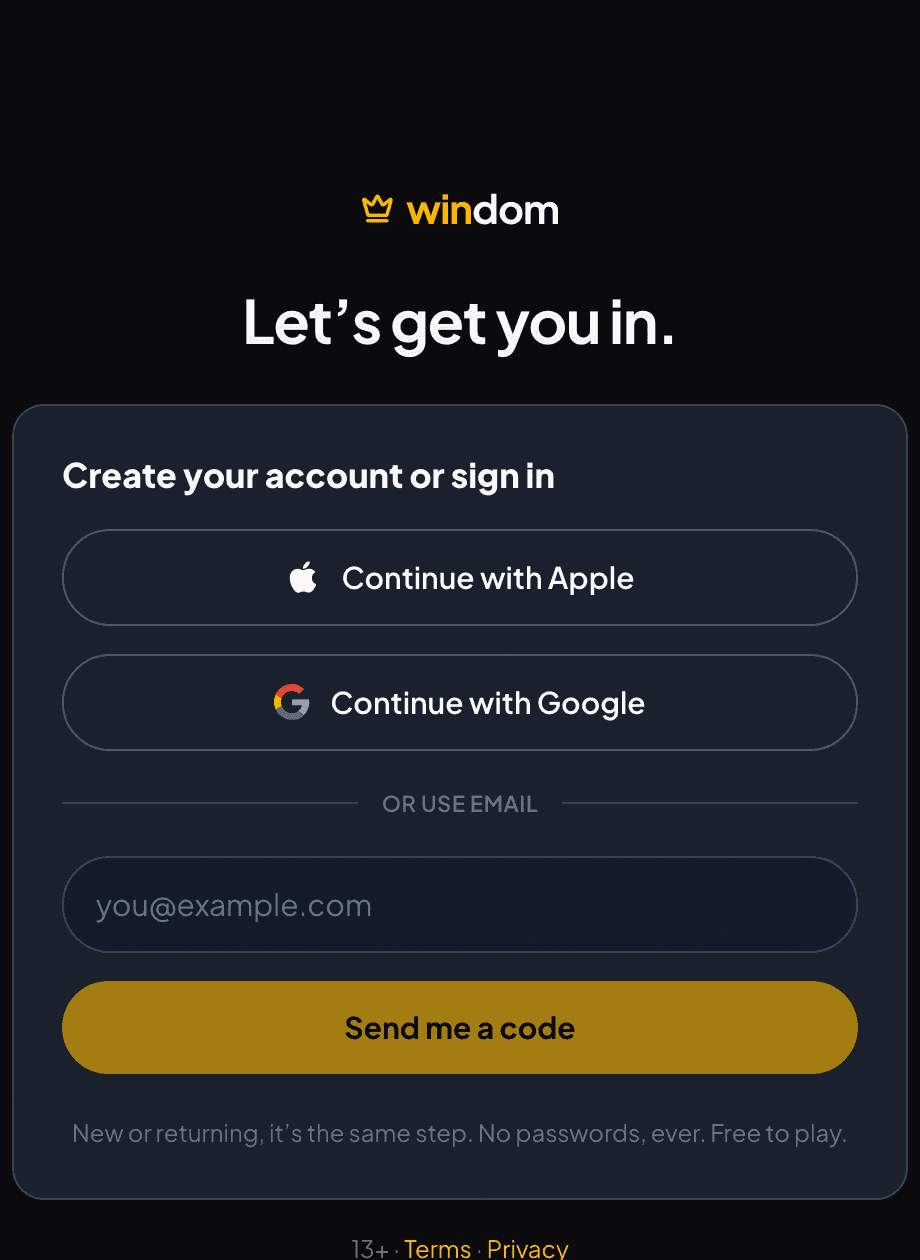
Sign in to Windom Sports
Type your email on the Windom Sports screen and enter the code we send you, or continue with Apple or Google. No account yet? This same screen makes one.
- 6
Click Connect to Claude
Check it shows your email, then click "Connect to Claude". You land back in Claude.
Part 3 · back in Claude
- 7
Set Tool permissions
Back in Claude, under "Tool permissions", set "Read-only tools" to "Always allow" so Claude stops asking before every lookup. For "Write/delete tools", choose "Always allow" for no prompts, or leave "Needs approval" so Claude asks before it joins a league or saves picks.
Now send your first message
Open a new chat in Claude and send this. Naming Windom Sports makes sure Claude uses your leagues.
- “How am I doing in my league?”
- “Swap the Magic for the Pacers.”
- “How does scoring work in this league?”
Play fantasy football and more in Claude
Windom Sports is team-based fantasy for casual fans, free to play. Once Claude is connected, every league you're in comes along. Here's what that looks like by sport.
College hoops tournament bracket Coming in March
Tell your AI what you believe and it fills out your whole bracket. Ask Claude: “Make my bracket. A few big upsets, and one 12 seed goes deep.”
Fantasy football with friends Ask from chat
Draft whole teams and root for real wins every week. Ask Claude: “How many points did my teams get this week?”
NBA season Picks in select leagues
Pick your teams and swap them before they lock. Ask Claude: “Swap the Magic for the Pacers.”
Every F1 race Picks in select leagues
Pick drivers for the next Grand Prix in seconds. Ask Claude: “Show me the drivers I can pick this race.”
Golf majors Ask from chat
Pick your golfers for the Masters or the US Open. Ask Claude: “How are my golfers doing after round 2?”
Soccer leagues Ask from chat
Premier League and more, all season long. Ask Claude: “Where do I rank in my league?”
New to all this? Start with how AI fantasy sports works. Use ChatGPT instead? Connect ChatGPT to your fantasy league. Building your own app? See the fantasy sports MCP server.
Claude fantasy sports questions
Is there a Claude connector for fantasy sports?
Yes. Windom Sports is a custom connector for Claude, and it works on free Claude. Add it once by following the steps above, then ask about your leagues and make picks in select leagues right in the chat.
Can Claude play fantasy football for me?
It can do a lot of it when you ask. Once Claude is connected to Windom Sports, it checks your standings, explains how your teams scored and finds leagues to join. In select leagues it saves and swaps your picks before they lock. Draft leagues pick their teams in the draft on Windom Sports.
Does this work on free Claude?
Yes. Free Claude plans can add one custom connector. Paid plans can add more. If your free plan already has a custom connector, remove it first or use a paid plan.
Can I do this on my phone?
Do the one-time setup on a computer, at claude.ai.
Which sign-in option do I pick?
You don't have to pick. Claude selects "Sign in now" and "Register automatically" for you and marks them "Detected". Just click "Add". If "Register automatically" isn't selected, choose it.
Claude keeps asking permission
In Claude, go to "Customize", then "Connectors", open Windom Sports and find "Tool permissions". There, set "Read-only tools" to "Always allow" so Claude stops asking before every lookup. For "Write/delete tools", choose "Always allow" for no prompts, or leave "Needs approval" so Claude asks before it joins a league or saves picks.
It says it can only read my leagues
Check "Tool permissions" under "Customize", then "Connectors": "Write/delete tools" must not be blocked. If that doesn't fix it, remove Windom Sports there and add it again, following the steps above.
How do I disconnect?
On windomsports.com, go to Account, find AI assistants and tap Disconnect. You can also remove it in Claude, under "Customize", then "Connectors".
Use a different assistant?
Free to play. No prizes, no wagering. Windom Sports is an independent platform and is not affiliated with, endorsed by, or sponsored by OpenAI, Anthropic, Meta or any sports league. ChatGPT, Claude and Muse are trademarks of their owners, named here only to describe compatibility.